In week 3 of physical computing we were looking at Servo motors and some of the application of servo motors. there are many kinds of servo motor that perform in different ways with different capabilities and specifications shown in their data sheets. I was using a DM SG90 servo which can rotate almost exactly 180 degrees and is lightweight with high power output. This is the SG90 data sheet…
 Using Servos is an interesting opportunity for experimentation because servos can be arranged to perform all kinds of actions and this is the first ability to physically move something I have had learning on this degree course. Here are examples of experiments made using Servos…
So my first experiment was really just to get the servo working and I did this by plugging the servo directly into the Arduino and applying some code.

An important inclusion in this code is #include servo.h which is needed to work with servos and the Arduino can hold up to 12 servos attached to the twelve output nodes. If you dont have the servo library download and include it in you project. Furthermore the servo must be declared as a servo object to be referenced (Servo myservo;) and must be attached to the corresponding node wired on the Arduino (myservo.attach(9)).
Another simple experiment was to use a potentiometer to use a mapped value of the resistance created by a turnable handle to move the servo between its minimum and maximum degrees. Like this…
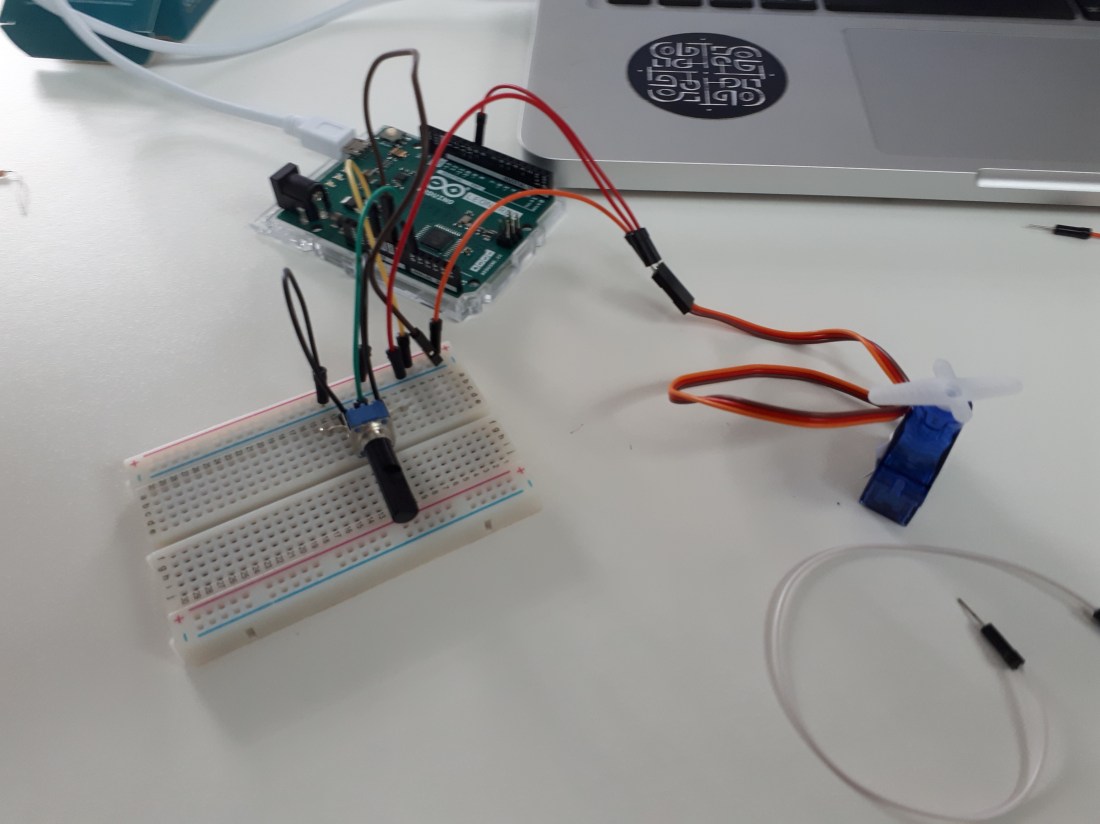
The wiring for this is a similar extension of the first experiment using a breadboard. The three nodes on the potentiometer are for power, ground and analogue input.

Here by using an AO analogue output node and mapping the value with (angle = map(angle, 0, 1023, 0, 179); the servo is written to move to the angle that corresponds to the resistance reading on the potentiometer.
The last experiment involved a spectra symbol softpot linear soft membrane potentiometer.
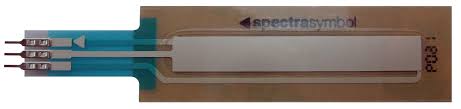
The result of using this touch sensitive linear soft membrane potentiometer is to collect data or resistance based on where contact is made with it. I used it to make the rotation angle of the servo respond to my touch on the sensor.

This image provides clearer representation of the circuit used with the softpot. The softpot has three nodes that are the interface for using the softpot, one is connected to 5V, ground and the A0 analogue input 0.


 Physical Computing Experimentation